

- Visit https://account.manomaylifesciences.com/new-dashboard/login/?utm_source=web
- Login to your account.
- Click on “Add New Member” button
- Click on “Add New Student” button
- “Allow Camera Access” in case system is asking for the permission
- Scan the “QR Code” available on the “Health Report Card” provided by the School (see the image below)
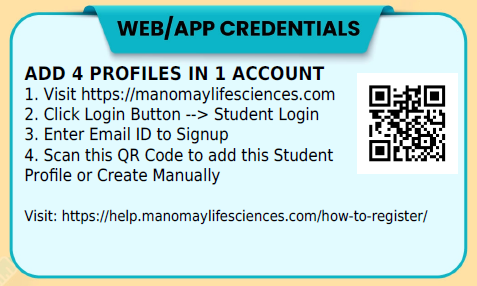
- Student’s profile will be added automatically
Lost Health Report Card?
In case you have lost the report card or not yet received. Don’t worry, we will help you, just follow the step and send us your details.
- Visit https://account.manomaylifesciences.com/new-dashboard/login/?utm_source=web
- Login to your account.
- Click on “Add New Member” button
- Click on “Add New Student” button
- Click on “Don’t Have a Barcode” button
- Fill up the following form and Click on the “Submit Request” button (see the image below)
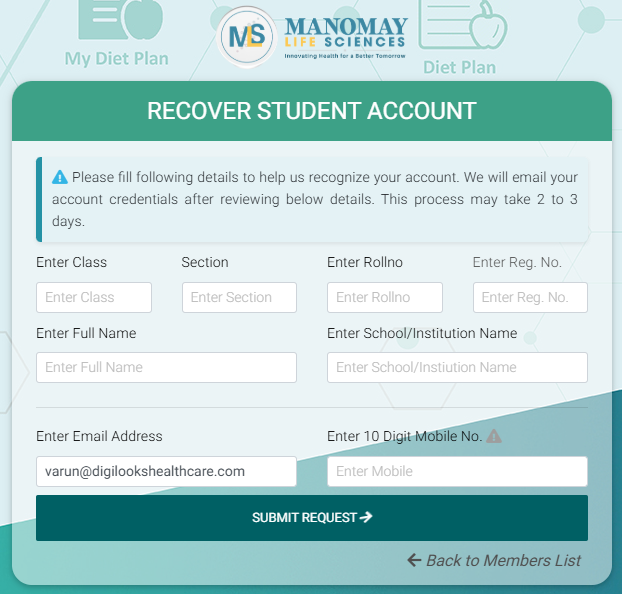
We will send you the “QR Code” on your email, it will take up to 2 to 3 days to verify your details.